

This Pictory Review 2026 comes from real use, not a press kit.
I used Pictory’s Audio to Video feature for the RankMath Affiliate competition, and it helped me win Best Video.
That tells you exactly what this tool does well.
It takes the slowest parts of video creation and shrinks them to minutes.
Scripting, footage, captions, voiceover, branding, and editing all happen in one browser tab.
But Pictory isn’t perfect, and it isn’t for everyone.
Below you’ll get the full picture, including pricing, every major feature, the weak spots, and a head-to-head with Syllaby.
Quick disclosure first.
Some links in this article are affiliate links, so I may earn a commission if you buy through them, at no extra cost to you.
That doesn’t change my verdict, and the criticism sits right next to the praise.
Pictory Snapshot
 Product: Pictory
Category: AI video generator and AI video editor
Best for: Bloggers, affiliate marketers, content creators, coaches, course creators, agencies and teams that need video fast
Launched: July 2020
Founders: Vikram Chalana, Vishal Chalana and Abid Mohammed
Free trial: 14 days, no credit card needed
Starting price: $25 per month billed annually, or $29 per month billed monthly
Black Friday offer: Professional annual plan at $29.50 per month instead of $59
Website: pictory.ai
My rating: 8.6 out of 10
Executive Summary
 Pictory is an AI video generator and editor that turns scripts, blog posts, web pages, slides, audio files, and long recordings into finished, branded videos.
You paste or upload your content, and Pictory builds a scene-by-scene storyboard with matching footage, captions, music, and voiceover.
Then you polish it in a simple scene-based editor with no timeline to learn.
The platform launched in 2020, and in March 2026 it grew into a much bigger product with AI avatars, generative video and images, voice cloning, and an AI video agent.
For most bloggers, affiliate marketers, and creators, the Professional plan is the sweet spot.
It adds custom avatars, voice clones, five brand kits, and three times the credits of Starter.
Here’s my bottom line.
Pictory is the fastest way I know to turn written content into polished video, and it offers a wider set of video creation and editing tools than Syllaby.
The weak spots are real, though.
The AI doesn’t always pick the right stock clips, some voices still sound synthetic, exports top out at 1080p, and paid plans don’t come with refunds.
Against Syllaby, Pictory wins on video features.
Syllaby wins on idea research, post scheduling, and entry price.
My score is 8.6 out of 10.
Everything in this review, including prices and features, was checked in November 2026.
What’s New in Pictory for 2026
Pictory moved fast this year.
Here are the changes that matter most.
Pictory 2.0 (March 2026). This was the biggest upgrade since launch.
It brought AI avatars, generative visuals through AI Studio, brand kits, and a hosting layer called Pictory Central into one platform.
AI video agent. You brief the agent in plain language, and it builds a video that you can then refine.
Newer AI models. Video generation runs on Veo 3.1, Veo 3.1 Fast, Pixverse and Omni Flash.
Image generation runs on Flux Schnell, Google Nano Banana (Lite, Standard and Pro), ByteDance Seedream and Amazon Nova Canvas.
Every plan gets access to all of them.
Credit-based plans. Pricing now runs on shared AI credits.
Annual plans grant all of the year’s credits upfront.
Avatars and voice clones. Stock avatars come with every plan.
Professional adds custom avatars and voice clones.
Audio to Video. Added in October 2025, this workflow turns a voice recording into a captioned, branded video.
Pictory MCP server. Launched in June 2025, it lets AI assistants and automation platforms connect to Pictory’s video creation API.
Mobile. Pictory released a first version of its mobile experience that runs in your phone’s browser.
It isn’t a native app yet.
Black Friday pricing. Professional annual plans are half price right now.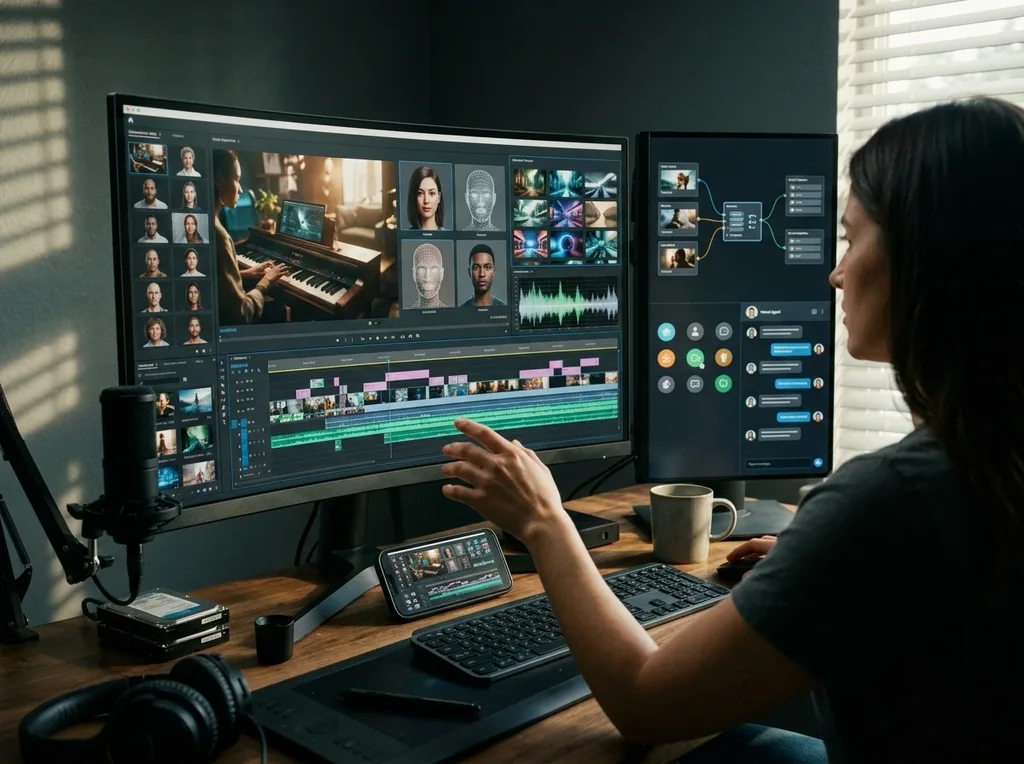
Pictory Review at a Glance
| Category | Details |
|---|---|
| Best for | Turning blogs, scripts, slides, audio, and recordings into branded videos |
| Free trial | 14 days, 300 credits, up to 3 videos |
| Starting price | $25 per month billed annually |
| Best plan | Professional |
| Ease of use | Beginner-friendly, scene-based editor |
| Editing style | Edit by script and transcript, no timeline |
| AI features | Avatars, voice clones, AI Studio, AI video agent, ElevenLabs voices |
| Stock library | Getty Images and Storyblocks |
| Max export | 1080p |
| Formats | 16:9, 9:16 and 1:1 |
| Languages | 29 on Professional and Teams, 7 on Starter |
| Support | Email on every plan, priority on Teams |
| Refunds | None on paid plans |
| My verdict | Best for fast, branded video from content you already have |
What Is Pictory?
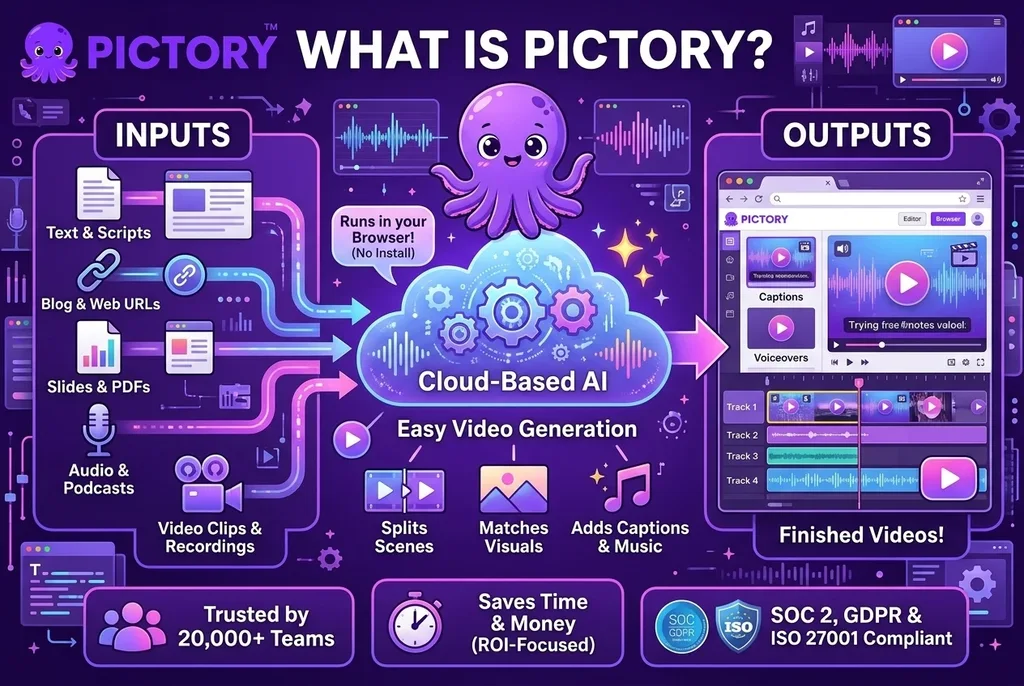 Pictory is a cloud-based AI video platform that turns text, links, slides, audio, and long recordings into finished videos.
It runs in your browser, so there’s nothing to install.
You pick a starting point, like a script or a blog URL.
Pictory writes or imports the text, splits it into scenes, matches visuals, adds captions and music, and hands you an editor to fine tune everything.
Why does that matter?
Because video isn’t optional anymore.
Wyzowl’s 2026 research found that 91% of businesses use video as a marketing tool, and 82% of video marketers say it has given them a good return on investment.
Most people still skip video for the same three reasons.
It takes too long, it costs too much, or they don’t know where to start.
Pictory goes after all three.
Here are the starting points it supports:
- Text and scripts
- Blog posts and web page URLs
- Ideas, where the AI writes the script
- Images and video clips
- PowerPoint, PDF and Word documents
- Audio files and podcasts
- Long videos and recordings
- Screen and webcam recordings
Pictory says more than 20,000 teams and institutions use the platform.
It also lists SOC 2 and GDPR compliance and an ISO 27001 seal on its site, which matters if you handle client or company content.
The Story Behind Pictory
 Pictory started as a fix for its founders’ own problem.
Vikram Chalana, Vishal Chalana, and Abid Mohammed all worked together at Winshuttle, an enterprise software company that Vikram and Vishal co-founded.
Their teams were spread across time zones, and getting clear messages to colleagues, partners, and customers was hard.
Short-form video, with its strong engagement on social media, looked like the answer.
There was one catch.
Neither Vikram nor Abid knew how to make polished videos, and hiring an agency or an in-house videographer was costly, slow and too rigid for frequent updates.
So they built a prototype at a hackathon in Seattle in 2019, and launched the first version of Pictory in July 2020.
In March 2026, Pictory launched Pictory 2.0, an integrated platform that combines creation, generative AI, avatars and interactive video hosting.
That origin story explains a lot about the product.
It was built by people who needed video fast, without a production team.
Who Pictory Is For
- Bloggers and affiliate marketers who want to turn written reviews and guides into video.
- Content creators who run YouTube, Shorts, Reels, or TikTok channels, including faceless ones.
- Coaches and course creators who need lessons, intros, and promos without filming.
- Podcasters who want to turn audio episodes into shareable video.
- Social media managers who need branded clips on a steady schedule.
- Agencies that produce video for several clients and need brand kits.
- Trainers and L&D teams who build onboarding and training content.
- Small business owners who want product videos and promos without hiring an editor.
If you’re brand new to online business, start with my guide on affiliate marketing for dummies and come back when you’re ready to add video.
Five Real-World Pictory Use Cases
1. Turn Blog Posts Into Videos
You already have the content, so start there.
Paste a post URL into URL to Video, and Pictory imports the article in an editable format.
You pick the sentences that matter, reorder the scenes and generate the video.
For affiliate sites, that means every strong review can become a YouTube video or social clip without starting from a blank page.
If you embed video on WordPress, keep an eye on load times, and my guide on how to speed up your WordPress website covers the basics.
2. Cut Webinars and Podcasts Into Clips
Upload a long recording, and Pictory transcribes it.
From there, the highlights tool picks out key moments, and the summary tool condenses the whole recording.
You can remove filler words and silences before you export.
Audio to Video handles podcast episodes too, with MP3 or WAV files up to 5 GB or 180 minutes, and it’s the feature I used to win the RankMath Affiliate competition.
One long recording can feed a week of social posts.
3. Build Faceless YouTube and Shorts Videos
Paste a script, pick a voice, choose a format, and let Pictory assemble the visuals.
Export vertical 9:16 for Shorts, Reels and TikTok, landscape 16:9 for YouTube, or square 1:1 for feeds.
Captions are added automatically, and the stock library is licensed for use in your videos.
That combination is why script-to-video tools are popular with faceless channel builders.
4. Create Course Lessons and Coaching Content
PPT to Video converts each slide into a scene, and speaker notes can become the narration.
Add your brand kit, a voiceover, and captions, and a slide deck becomes a lesson.
Coaches can add an AI avatar as the presenter instead of filming.
When the lessons are ready, you’ll need somewhere to host them, so check my list of the best online course platforms.
5. Produce Training and Internal Videos
Training teams use Pictory to turn documents and slides into onboarding videos.
Avatars can present the material, and brand kits keep every video on brand.
The Teams plan adds shared brand assets and collaboration.
Enterprise adds SSO, SCORM export for learning management systems, quizzes, clickable calls to action, and Pictory Central hosting.
How Pictory Helped Me Win the RankMath Affiliate Competition
 Let me tell you where my opinion of Pictory comes from.
I entered the RankMath Affiliate competition and built my video with Pictory’s Audio to Video feature.
It helped me win the best video.
Audio to Video is the workflow where you start with a voice recording instead of a script.
You upload an MP3 or WAV file, and Pictory transcribes it.
Then it breaks the audio into scenes and matches visuals to what’s being said.
You can clean up the transcript, apply your brand colors and logo, and style the captions before you export.
That means your own voice carries the message, and Pictory handles the visuals.
That result wasn’t luck, and it wasn’t about fancy editing skills.
Contest deadlines are tight, and judges watch a lot of entries.
Pictory suits that pressure for a few simple reasons.
- Speed. You go from script to a full draft in minutes, so you spend your time on the message instead of the software.
- Clean captions. Subtitles are generated automatically, and you can style them to match your look.
- Brand control. Brand kits keep your logo, colors, and fonts consistent from the first scene to the last.
- Easy revisions. Swapping a clip, rewriting a line, or changing the format takes a few clicks, not a re-render from scratch.
- Format flexibility. You can export landscape, vertical, or square from the same project.
Here’s the lesson I took from it.
A good video is mostly a good script, and Pictory removes everything that stands between your script and the screen.
If you’re new to the contest itself, my Rank Math review is the place to start.
Pictory Pricing 2026: Full Breakdown
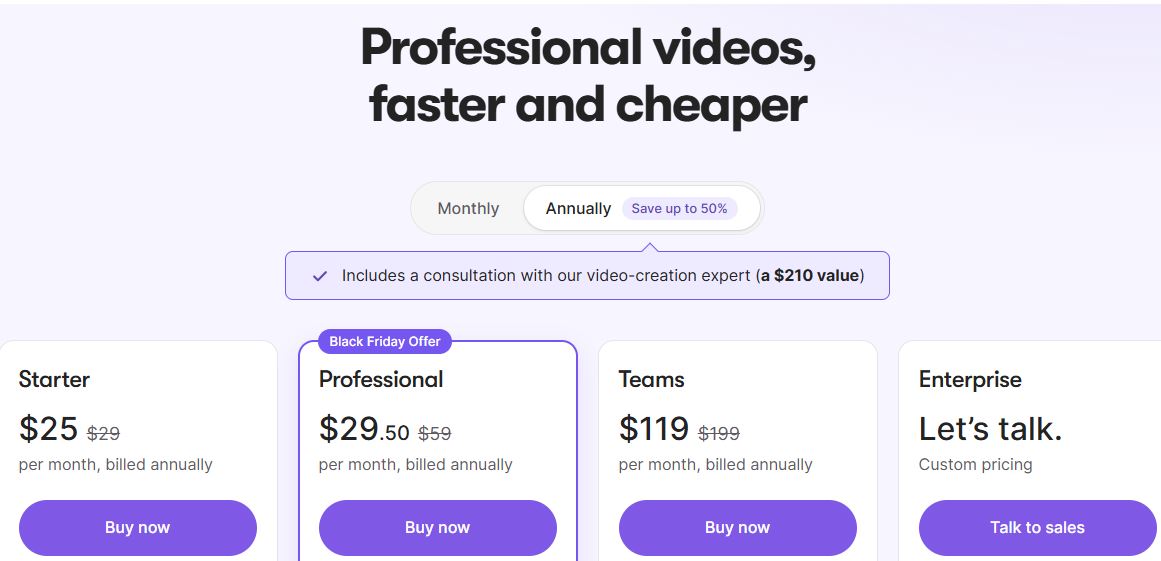
Pictory runs on four plans: Starter, Professional, Teams, and Enterprise.
Every plan includes the same AI toolkit, with the AI video agent, all image, video, avatar, and voice models, the scene editor, AI Studio, automatic subtitles, premium media and music, and stock avatars.
Plans differ in credits, users, brand kits, storage, and a few premium extras.
| Plan | Monthly billing | Annual billing (per month) | Credits | Video minutes | Brand kits | Storage |
|---|---|---|---|---|---|---|
| Free trial | Free for 14 days | Not applicable | 300 | Up to 10 | 1 | 500 MB |
| Starter | $29 | $25 | 2,000 monthly or 24,000 yearly | Up to 30 monthly or 360 yearly | 1 | 5 GB |
| Professional | $59 | $29.50 (Black Friday) | 6,000 monthly or 72,000 yearly | Up to 90 monthly or 1,080 yearly | 5 | 20 GB |
| Teams | $199 | $119 | 18,000 monthly or 216,000 yearly | Up to 300 monthly or 3,600 yearly | 10 | 100 GB |
| Enterprise | Custom | Custom | Custom | Custom | Custom | Custom |
You can start the Pictory free trial here and test the platform before you pay.
 The Free Trial
The free trial lasts 14 days and gives you 300 credits, which covers up to 10 minutes of video.
You can create 3 video projects, and each video made from a script or URL can run up to 5 minutes.
Exports carry Pictory branding and top out at 720p.
The AI video editor accepts uploads up to 15 minutes long and 1 GB in size.
After the trial ends, you can still open your projects, but downloading requires a paid plan.
That’s enough to test text-to-video, the editor, and the stock library, which are the three things that decide whether Pictory fits you.
Starter Plan
Starter costs $25 per month on annual billing or $29 per month on monthly billing.
Annual billing gives you 24,000 credits upfront, enough for up to 360 minutes of video across the year.
Monthly billing gives you 2,000 credits, or up to 30 minutes.
You get one user, one brand kit, 5 GB of storage, stock avatars, ElevenLabs voices, and access to more than 5 million royalty-free videos from Getty Images and Storyblocks.
The editor accepts videos up to 60 minutes and 1 GB.
Starter does not include the automatic video summary feature, custom avatars, voice clones or custom brand fonts.
It supports 7 languages, compared with 29 on the higher plans.
Professional Plan
Professional costs $59 per month on monthly billing.
The Black Friday offer drops the annual plan to $29.50 per month, which is half off.
It includes 72,000 credits upfront on annual billing, or 6,000 per month on monthly billing, which is three times the Starter allowance.
You get custom brand fonts, five brand kits, 20 GB of storage, unlimited standard voices, two custom avatars, voice clones and access to more than 18 million Getty and Storyblocks videos.
The editor accepts videos up to 180 minutes and 5 GB.
Automatic video summaries are included, and you get three times more ElevenLabs voice and avatar usage than Starter.
This is the plan I’d pick for most bloggers and creators.
Teams Plan
Teams costs $119 per month on annual billing or $199 per month on monthly billing.
It adds three or more users, shared brand assets, sharing and collaboration, onboarding and training, ten brand kits, and 100 GB of storage.
You also get priority support and two custom avatars per user.
It makes sense when several people need to work on the same videos.
Enterprise Plan
Enterprise pricing is custom, and you book a call with Pictory’s sales team.
It includes everything in Teams plus single sign-on, custom-built templates, a dedicated account manager, priority support and video consulting.
It’s also where the interactive features live, including AI-generated chapters, clickable calls to action, quizzes and knowledge checks, SCORM export for learning management systems and Pictory Central hosting.
Pictory’s API has its own separate pricing.
The Black Friday Offer
Pictory’s pricing page currently shows 50% off Professional annual plans.
That takes Professional from $59 to $29.50 per month.
Black Friday offers change, so confirm the price and the end date at checkout after you click through.
How Pictory Credits Work
Credits are the shared currency across every AI usage feature.
There’s one common pool for everything you create, from videos to images to avatars.
Annual plans grant all credits upfront, so you can use more in a busy month without waiting for a renewal.
Monthly plans refresh the allowance each month.
Pictory translates credits into video minutes for you, and Professional’s 72,000 credits cover 1,080 minutes a year.
That works out to roughly 67 credits per minute of video on Starter and Professional, and 60 on Teams.
Because every AI generation draws from the same balance, plan your generative clips before you hit generate.
What You’d Pay for Separately
Pictory bundles several tools that you’d otherwise pay for one by one.
| What you need | Included in Pictory | Separate tool example |
|---|---|---|
| AI voiceovers | ElevenLabs voices on every plan | ElevenLabs |
| Stock footage and images | Getty Images and Storyblocks libraries | A stock media subscription |
| Music | 5,000 premium tracks on Starter, 15,000 on Professional | A music licensing subscription |
| Captions and transcripts | Automatic subtitles with .srt, .vtt and txt export | A transcription tool |
| Video editing | Scene editor and text-based editing | A traditional video editor |
| AI images and clips | AI Studio with Veo 3.1 and Nano Banana | Separate AI generator subscriptions |
Voice alone through ElevenLabs runs $6 per month on its Starter plan and $22 per month on Creator, before you pay for footage, captions or an editor.
That’s why the bundle matters.
Refunds, Cancellation and Extras
Pictory doesn’t offer refunds on paid subscriptions.
You can cancel anytime, and you won’t be charged on renewal.
But download your videos before you cancel, because projects are permanently deleted when the account closes.
Annual plans include a consultation with a Pictory video creation expert, which Pictory values at $210.
Non-profits can ask for a discount through the chat box inside the app.
Prices are in US dollars, and Pictory accepts major cards and PayPal.
Pictory also says you don’t owe royalties for the visuals, music, or voiceovers it has licensed for use in your videos.
Which Plan Should You Pick?
- Start with the free trial if you’ve never used an AI video tool.
- Choose Starter if you make a few videos a month and don’t need avatars, voice clones, or video summaries.
- Choose Professional if you publish regularly or want custom avatars, voice clones, and more brand kits.
- Choose Teams if three or more people share the work.
- Choose Enterprise if you need SSO, SCORM, or interactive hosting.
Pictory Features: Full Breakdown
Pictory has a long feature list, so here’s each major tool, how it works, and where it falls short.
1. Text to Video (Script to Video)
This is Pictory’s flagship tool, and the one most people start with.
You paste a script into the editor, and Pictory splits it into scenes at sentence breaks, line breaks, or both.
It matches stock footage to each scene, adds captions and background music, and builds a draft you can edit.
You can highlight key sentences to guide which visuals the AI picks, turn automatic visual selection off, and run a spell check before you generate.
The limitation is visual matching.
The AI picks reasonable footage, but it can land on generic or off-topic clips, especially for technical topics.
The first draft can also feel flat until you swap a few clips and add a voiceover.
2. URL to Video (Blog to Video)
Paste a blog URL, and Pictory imports the article in an editable format.
You click the sentences you want; each becomes a scene, and you can reorder them before you generate.
That control is what makes it useful for bloggers.
You decide which parts of your post become the video instead of letting the AI guess.
The limitation is the auto summary.
Older tests found that automatically generated summaries can skip key points, so treat the imported script as a draft and edit it before you generate.
Pictory also offers a Chrome extension for turning web content into short-form video.
3. Idea to Video, AI Script Generator and AI Video Agent
No script yet?
Choose Start with an idea, pick a video type such as explainer, marketing, tutorial, product introduction or internal communication, add a prompt, and pick the platform and length.
Pictory writes the script, and you can edit it like a document or highlight lines and ask the AI to rephrase or shorten them.
The new AI video agent goes a step further.
You brief it in plain language, and it builds a video that you refine in the editor.
The limitation is control over length.
Testers have asked for a one-minute video and received one that ran longer, so check the runtime before you generate.
4. AI Video Editor (Edit by Text)
Upload a video or recording, and Pictory transcribes it automatically.
Then you edit the video by editing the transcript.
Delete a sentence, and that exact section of video disappears.
One toggle removes filler words like um and so, and another removes silences.
You can add captions, branding, call-to-action overlays, and switch the format for different platforms.
Upload limits depend on your plan: 60 minutes and 1 GB on Starter, 180 minutes and 5 GB on Professional and Teams.
The limitation is that there’s no timeline.
You won’t get frame-by-frame control, color grading, filters, or precise speed changes, so this is not a replacement for Premiere Pro or DaVinci Resolve.
For talking head videos, tutorials, and interviews, though, text-based editing is faster than any timeline.
5. Video Highlights and Auto Summaries
Have a long webinar, Zoom call, or interview?
Pictory finds the key moments and builds short clips, and you can add or remove sections by hand.
The auto summary tool condenses a long video into a short version of its main points.
That’s the fastest way to turn one recording into trailers and social clips.
The limitation is plan gating.
Automatic video summaries are included on Professional, Teams, and the free trial, but not on Starter.
6. Audio to Video
Upload an MP3 or WAV file, up to 5 GB or 180 minutes.
Pictory transcribes it, lets you clean up the transcript, and then builds scenes with matching visuals and captions.
You can apply your brand colors and logo, and add a voiceover or music on top.
This is built for podcasters, educators, and anyone sitting on recorded audio, and it’s the feature behind my RankMath contest win.
The limitation is the visuals.
They come from stock libraries and AI generation, so the video looks like an illustrated audiogram, not a filmed episode.
7. PPT, PDF, Doc and Image to Video
PowerPoint to Video is included on every plan.
Upload a .pptx file, and each slide becomes a scene you can edit, animate, and style.
If your slides have speaker notes, Pictory can use them as the narration.
PDF and Word documents work as starting points too, and Image to Video turns a set of photos or clips into a slideshow with transitions and music.
There’s also a PowerPoint plugin.
The limitation is that the result depends on the slides.
A text-heavy deck becomes a text-heavy video, so simplify your slides first.
8. AI Studio (Generative Images and Video)
AI Studio lets you generate custom images and short video clips from a prompt, right inside the editor.
Use it when stock footage can’t show what you need.
Video models include Veo 3.1, Veo 3.1 Fast, Pixverse and Omni Flash.
Image models include Flux Schnell, Google Nano Banana (Lite, Standard and Pro), ByteDance Seedream and Amazon Nova Canvas.
You can edit a generated image with a text prompt, such as asking for a vase to turn purple.
Pictory says everything generated through AI Studio is unique and safe for commercial projects.
The limitation is credits.
Every generation draws from the same shared pool as the rest of your AI features.
9. AI Avatars and Voice Cloning
Avatars are the headline feature of Pictory 2.0.
Stock avatars come with every plan, and they read your script with lip sync, so you get an on-screen presenter without a camera.
Professional adds custom avatars, which are avatars made from you, and voice clones, so your narration sounds like you.
Use them for product explainers, training modules, onboarding, and course intros.
The limitation is realism.
Pictory’s avatars are a feature inside a video editor, while dedicated platforms like Synthesia and HeyGen are built around the avatar itself.
If avatars are your main product, compare them side by side.
10. AI Voices and Translation
Pictory includes multilingual, hyper-realistic AI voices from ElevenLabs on every plan, plus unlimited standard voices on Professional.
You can also upload your own voiceover and have Pictory sync it to the scenes.
Professional and Teams support 29 languages, and Starter supports 7.
You can translate a video into other languages and choose accents, ages, and styles.
The limitation is quality and allowance.
Some standard voices still sound synthetic, especially in long videos, and Starter’s ElevenLabs allowance is a third of what Professional gives you.
11. Automatic Captions and Subtitles
Captions are generated from your audio on every plan, and you can export them as .srt, .vtt or txt files.
You can change fonts, colors, size and position to match your brand.
The .txt export is handy for pasting a transcript under a video on your blog.
The limitation is line breaks.
The AI decides where captions split, and sometimes you’ll want to tweak a line by hand.
12. Brand Kits, Layouts and Export Formats
A brand kit saves your logo, colors, and fonts so every video looks the same.
Starter gets one, Professional gets five, and Teams gets ten, and Professional adds custom brand fonts.
There’s also a styles library, layouts, and more than 40 ready-made templates.
You can export 16:9 landscape, 9:16 vertical, and 1:1 square, up to 1080p.
The limitation is resizing and resolution.
Older reviews complain that switching from landscape to vertical crops the footage instead of resizing it, and Pictory’s Smart Layouts are built to fix that.
Still, check every scene after you change formats.
And if you need 4K, Pictory isn’t the tool.
13. Stock Library and Music
Pictory includes Getty Images and Storyblocks footage and images, with more than 5 million on Starter and more than 18 million on Professional and Teams.
Music comes from 5,000 premium tracks on Starter and 15,000 on Professional and up.
Because it’s all licensed, you don’t pay royalties for visuals or music used in your videos.
The limitation is the stock look.
Stock footage is stock footage, so mix in your own clips or AI Studio visuals if you want the video to feel original.
14. Screen and Webcam Recording
Pictory’s Record tool captures your screen, your webcam, or both.
After you record, you get an automatic transcript, so you can trim silences, remove filler words, add subtitles, and cut highlights, all by editing text.
It’s handy for tutorials, demos, and walkthroughs.
The limitation is that it was labeled beta in earlier tests.
Treat it as a handy extra, not the reason you buy Pictory.
15. Teams, API, MCP and Integrations
The Teams plan adds shared brand assets and collaboration.
Pictory has an API for automating video creation, with its own pricing, and an MCP server so AI assistants and automation tools can connect to it.
Integrations include Zapier and Pabbly, and there’s a Pictory GPT for ChatGPT Plus users.
The limitation is access.
API access isn’t included in any standard plan, so developers need to budget for it separately.
What Pictory Videos Actually Look Like
Let’s set honest expectations.
Pictory videos look like polished explainers built from stock footage, text animations, captions, and voiceover.
They don’t look like cinematic films, and they don’t try to.
Reviewers who’ve used it describe the AI draft as landing somewhere between 60 and 90 percent finished.
The rest is on you, and that’s where the quality gap shows up.
Here’s how to close it:
- Write a tight script, because the AI can only match visuals to what you say.
- Highlight the key sentences so the AI knows what to show.
- Replace any clip that doesn’t fit the line.
- Add a voiceover, because a video without one feels unfinished.
- Apply your brand kit so every video looks like yours.
- Mix in your own footage or AI Studio visuals for variety.
Do those six things, and Pictory’s output looks professional.
Skip them, and it looks like what it is: an AI first draft.
Pictory Pros and Cons
What I Like
- It’s genuinely beginner-friendly, with no timeline and no editing background needed.
- Blog-to-video and script-to-video turn content you already have into video in minutes.
- Text-based editing makes cutting filler words, silences, and whole sections as easy as editing a document.
- The bundle is strong, with ElevenLabs voices, Getty and Storyblocks footage, music, captions, and AI Studio on every plan.
- Brand kits keep your videos consistent.
- Avatars, voice clones, and generative video put Pictory 2.0 in the same conversation as newer tools.
- Annual plans grant all credits upfront.
- The 14-day free trial lets you test it before you spend anything.
- SOC 2, GDPR, and ISO 27001 credentials help for client and company work.
What Could Be Better
- Stock clip matching isn’t always accurate, so expect to swap some clips.
- Some AI voices still sound synthetic.
- There’s no timeline editor, so advanced editors will feel boxed in.
- Exports top out at 1080p.
- Paid plans don’t come with refunds.
- Videos generated from a script or URL max out at 30 minutes.
- Projects are deleted when you cancel, so you must download first.
- Interactive features like quizzes, clickable calls to action, and SCORM export are Enterprise only.
- Credits are one shared pool, so heavy generative use can drain your balance.
Things You Won’t Notice Until You Start Using Pictory
These details don’t show up in the headline pricing, but they matter.
- Plan gates are specific. Automatic video summaries, custom avatars, voice clones, and custom brand fonts are not on Starter.
- Language support jumps. Starter supports 7 languages, while Professional and Teams support 29.
- Trial videos carry a watermark. Pictory branding is removed only on paid plans.
- Annual billing changes how credits work. You receive the whole year’s credits upfront, which is handy for bursts of work.
- The 30-minute cap applies to generated videos. The editor accepts much longer uploads, up to 180 minutes on Professional.
- Mobile is browser-based. There’s no native app yet.
- Resolution tops out at 1080p. That’s fine for YouTube and social, but not for 4K projects.
Common Mistakes to Avoid
- Generating before editing the script. Fix the wording first, because every change after generation costs time.
- Skipping key sentence highlights. Highlighting tells the AI what to show.
- Accepting every stock clip. Replace anything that doesn’t match the line.
- Ignoring the format. Decide on landscape, vertical or square before you start, then check every scene if you change it.
- Buying Starter, then needing Professional features. If you want avatars or voice clones, start on Professional.
- Cancelling before downloading. Your projects are deleted when the account closes.
- Using one style for every video. Rotate layouts and styles so your channel doesn’t look repetitive.
- Burning credits on experiments. Plan generative clips before you hit generate.
- Forgetting the transcript. Export the txt captions and paste them under your video on your blog.
Using Pictory for Your Blog and Affiliate Site
This is where Pictory fits my own workflow best.
Every strong post on an affiliate site can become a short video.
Here’s a simple routine that works.
- Pick a post that already performs well.
- Paste its URL into URL to Video and select the key sentences.
- Add a voiceover, your brand kit, and captions.
- Export vertical for social and landscape for YouTube.
- Embed the video in the post and paste the transcript below it.
- Link back to the post from the YouTube description.
It gives readers another way to consume the content, and it gives you more places to be found.
To get the SEO side of the post right, my Rank Math AI Link Genius review covers internal linking.
And if you want to send those videos to subscribers, compare the best email marketing platforms.
Pictory Support and Community
Email support is included on every plan, and Teams adds priority support.
The help center at kb.pictory.ai covers how to use each feature, and Pictory Academy publishes step-by-step guides and case studies.
There’s an active creators community on Facebook and a Pictory community on Reddit.
Pictory also runs a public product roadmap where users suggest and vote on features.
Vendor replies to user reviews are frequent and point people to those channels.
Software Advice reviewers rate customer support 4.7 out of 5.
The downside is that there’s no live chat on lower plans and no refund safety net, so test the trial thoroughly before you commit.
If you’re looking for other creators to learn from, my list of the best affiliate marketing Facebook groups is a good next step.
What Real Users Say About Pictory
Pictory holds a 4.6 out of 5 rating from 82 reviews on G2.
On Software Advice, it scores 4.8 out of 5 from 163 reviews, with 136 of them giving five stars.
Subratings on that page are 4.8 for ease of use, 4.7 for customer support, 4.7 for value for money, and 4.6 for functionality.
Only five of the 163 reviews give three stars or fewer.
There’s an important caveat.
Software Advice labels which reviewers were invited by the vendor and offered a small thank-you, and most reviews on the first page carry that label.
So weigh the glowing ones accordingly.
The patterns still hold across reviews.
- Praise: ease of use, time savings, the media library, and fast script-to-video.
- Complaints: stock clips that miss the mark, aspect ratio changes that crop instead of resize, slow or failed downloads, scene reordering glitches, and basic folder organization.
- Billing and access: a small number of reviewers report subscription or promised feature disputes, including long-time lifetime deal buyers.
That matches what I’d tell you after using it.
It’s easy and quick, and the weak spots are polish and edge cases.
Pictory vs Syllaby: Which AI Video Tool Is Better?
Pictory is the better tool if you want deeper video creation and editing.
Syllaby is the better tool if you want ideas, video, and scheduling in one app at a lower entry price.
Here’s the full comparison.
Syllaby is built around finding trending ideas, writing AI scripts, creating faceless and avatar videos, and scheduling posts.
I cover it in detail in my Syllaby review.
Pictory is built around turning content you already have into edited, branded videos.
| Feature | Pictory | Syllaby |
|---|---|---|
| Core focus | Turning scripts, posts, slides, audio, and recordings into edited videos | Trending ideas, AI scripts, faceless and avatar videos, scheduling |
| Entry price | $25 per month billed annually, $29 monthly | $9 per month (Starter) |
| Mid tiers | Professional $59 monthly, $29.50 annual with Black Friday | Basic $29, Standard $78 |
| Top tier | Teams $119 annual, $199 monthly | Premium $153 per month |
| Free trial | 14 days, 300 credits | None |
| Refunds | None on paid plans | 30 days from payment |
| Starting points | Text, script, URL, idea, images, PPT, PDF, Word, audio, video, screen recording | Ideas, trending topics and AI scripts |
| Editing | Scene editor, edit by transcript, filler word and silence removal, highlights, summaries | Built-in video editor |
| Video models | Veo 3.1, Veo 3.1 Fast, Pixverse, Omni Flash | Veo 3.1, Seedance 2.5, Kling, Grok Imagine, MiniMax |
| Avatars | Stock on every plan, custom from Professional | Avatars 2.0 and Real Clone avatars |
| Voice clones | Professional and up | 1 on Basic, 3 on Standard, 5 on Premium |
| Max video length | 30 minutes generated, editor up to 60 or 180 | Unlimited |
| Scheduling and analytics | Focused on making the video | Content calendar, bulk scheduling, social analytics |
| Mobile | Browser based | Native iOS and Android apps |
| API and MCP | Yes | Yes |
| Enterprise extras | SSO, SCORM, quizzes, Pictory Central hosting | Enterprise plan with API access, plus a done for you service at $699 per month |
Where Pictory Wins
Pictory has the deeper video toolbox.
It starts with more inputs, including PowerPoint, PDF, Word, audio, long videos, and screen recordings.
It edits by transcript, removes filler words and silences, builds highlights and summaries, and translates into 29 languages.
It also bundles Getty and Storyblocks libraries, and its Enterprise tier adds SCORM export and interactive hosting.
If you’re repurposing blogs, webinars, podcasts or training material, Pictory is the stronger choice.
Where Syllaby Wins
Syllaby starts at $9 per month, and its pricing page lists unlimited video length on every plan.
It handles the research side with trending ideas, and it has a content calendar, bulk scheduling, and social analytics.
It also has native iOS and Android apps and a 30-day refund policy, while Pictory has a free trial and no refunds.
If you’re building a faceless channel from trending topics and want one app to plan and schedule it, Syllaby fits better.
How the Credits Compare
On paper, entry plans give you a similar amount of video.
Pictory Starter covers up to 30 minutes of video per month.
Syllaby counts a faceless video at 13 credits per minute, so its 500-credit Basic plan covers about 38 faceless one-minute videos.
Avatar videos cost more on Syllaby, at 50 credits per minute.
The real difference isn’t the minutes; it’s what each minute includes.
My Pick
Choose Pictory if video quality, editing, and repurposing matter most to you.
Choose Syllaby if idea research, scheduling, and a low entry price matter most.
If budget allows, there’s nothing wrong with using Syllaby to find ideas and Pictory to produce the polished version.
See where both sit on my best AI tools list.
Pictory vs Other AI Video Tools
Pictory isn’t the only option, and Unite.AI’s review of Pictory compares it with three alternatives.
| Tool | Best for | Where it beats Pictory | Where Pictory wins |
|---|---|---|---|
| Synthesia | Corporate training and onboarding | Realistic avatars, 160+ languages, team collaboration | Simple repurposing and editing from text |
| Synthesys | Avatars and voiceovers in many languages | 140+ languages and more realistic avatars | Content repurposing and beginner workflows |
| InVideo | Building videos from a prompt | Prompt-based editing and a large stock library | Speed when repurposing content you already have |
Pictory supports 29 languages, so avatar-heavy or multilingual projects are where these tools pull ahead.
How to Get Started With Pictory
Getting your first video out takes about 15 minutes.
- Start the free trial. Sign up for Pictory here, and you’ll land in the dashboard with eight starting points.
- Pick Text to Video. It’s the simplest place to begin.
- Paste or generate a script. Keep it tight, and fix the wording before you generate.
- Choose your format. Pick landscape, vertical, or square based on where you’ll post.
- Highlight key sentences. This guides the AI’s visual choices.
- Select a style or brand kit. Add your logo, colors, and fonts.
- Replace weak clips. Swap anything that doesn’t match the line.
- Add a voiceover and captions. Choose an ElevenLabs voice or upload your own.
- Export and publish. Download the video, embed it in your post, and share it.
If you plan to send viewers to a page, a good landing page builder helps you turn views into clicks.
Who Should Not Use Pictory
Pictory isn’t for everyone, and I’d rather tell you now.
- Professional editors. You’ll miss timeline control, effects, and color grading.
- Filmmakers and cinematic creators. Stock-based videos won’t give you that look.
- Anyone who needs 4K. Exports stop at 1080p.
- People who need refunds. Paid plans don’t include them, so use the trial first.
- Creators who want ideas and scheduling in one app. Syllaby is built for that.
- Teams that need the most realistic avatars. Dedicated avatar platforms go further.
- Anyone who wants a permanently free plan. There’s only a 14-day trial.
If you’re building a wider AI and funnel stack, my MakerAI review and GoHighLevel review are worth a look.
Final Verdict and Scores
| Category | Score |
|---|---|
| Ease of use | 9.5 / 10 |
| Feature depth | 9 / 10 |
| Output quality | 8 / 10 |
| Value for money | 8.5 / 10 |
| AI capabilities | 8.5 / 10 |
| Support | 8 / 10 |
| Overall | 8.6 / 10 |
Pictory earns its score by doing one job extremely well.
It turns content you already have into branded video, fast.
It loses points for generic stock matches, synthetic voices, the 1080p cap, and the no-refund policy.
But for bloggers, affiliate marketers, coaches, course creators, and small teams, it’s one of the most practical AI video tools available.
Pictory FAQ
Here are quick answers to the questions I hear most about Pictory.
Is Pictory worth it in 2026?
Yes, if you create video from existing content like blog posts, scripts, slides or recordings.
It saves hours per video and bundles voices, stock media, and captions.
It’s less suited to cinematic projects or 4K work.
Is there a Pictory free trial?
Yes, Pictory offers a 14-day free trial with 300 credits, which covers up to 10 minutes of video.
You can create 3 video projects, and exports carry Pictory branding.
How much does Pictory cost?
Starter costs $25 per month on annual billing or $29 on monthly billing.
Professional costs $59 monthly, with a Black Friday annual price of $29.50 per month.
Teams costs $119 per month on annual billing or $199 monthly, and Enterprise is custom.
Does Pictory offer refunds?
No, Pictory doesn’t currently offer refunds on paid subscriptions.
You can cancel anytime, and you won’t be charged on renewal.
Is Pictory good for beginners?
Yes, it’s built for people with no editing experience.
The scene-based editor has no timeline, and every workflow starts with a simple input like a script or a URL.
Can Pictory turn a blog post into a video?
Yes, paste the URL into URL to Video, choose the sentences you want, reorder the scenes and generate the video.
Treat the imported text as a draft and edit it first.
Does Pictory have AI avatars?
Yes, every plan includes stock avatars.
Professional adds custom avatars and voice clones.
How many languages does Pictory support?
Professional and Teams plans support 29 languages, and Starter supports seven.
What is the maximum video length?
Videos generated from a script, article or URL can run up to 30 minutes.
The AI video editor accepts uploads up to 60 minutes on Starter and 180 minutes on Professional and Teams.
Does Pictory add a watermark?
Trial exports carry Pictory branding.
Paid plans don’t.
Can I use Pictory videos commercially?
Pictory says it has licensed the clips, music, and voiceovers used in your videos, so you don’t owe royalties.
It also says AI Studio creations are unique and safe for commercial projects.
Is Pictory secure?
Pictory lists SOC 2 and GDPR compliance and an ISO 27001 seal.
Does Pictory have an API?
Yes, Pictory has an API and an MCP server, and the API has its own pricing.
Pictory or Syllaby: which should I choose?
Choose Pictory for deeper editing and repurposing.
Choose Syllaby for trending ideas, scheduling, and a lower entry price.
Conclusion: Is Pictory Worth It in 2026?
Pictory is one of the easiest ways to turn written content into polished, branded video.
It packs scripts, stock media, AI voices, captions, avatars, and generative visuals into one editor, and it lets beginners ship video without learning a timeline.
The trade-offs are clear.
Expect to swap some clips, polish the voices, and live with a 1080p cap and no refunds.
If you create from content you already have, the Professional plan is the best fit, especially at the Black Friday price.
If ideas and scheduling matter more, look at Syllaby instead.
The best next step is to test it yourself.
Start your free Pictory trial here, build one video from a blog post, and see how much time you save.
Thanks for reading my Pictory Review 2026.
Pictory
Pictory is an AI-powered video creation and editing platform that turns text, scripts, blog posts, URLs, and presentations into finished videos within minutes.
Price: $29
Price Currency: US Dollars
4.6



 Live Bootcamp with a HighLevel Coach






 : Free Bootcamp
