
This Synup Review 2026 answers one question.
Is an AI agent that runs your local marketing worth paying for in 2026?
Local search has changed fast.
Customers read reviews before they call, and AI assistants now answer local questions too.
I cover more tools like this in my guide to the best AI tools.
So your listings, your reviews, and your AI visibility all matter at the same time.
That’s the exact problem Synup says it solves.
Quick disclosure: this post contains affiliate links.
If you sign up through them, I may earn a commission at no extra cost to you.
That doesn’t change what I tell you, and you’ll see the downsides in this review too.
I’ve got Synup open on my screen, so I’ll show you what’s inside as we go.
Synup Product Snapshot
 Product: Synup
Category: Local marketing platform with an AI agent (listings, reviews, social, local SEO, AI search visibility)
Founded: 2014 (some outlets say 2013)
Headquarters: New York, United States
Co-founders: Ashwin Ramesh (CEO), Karthik Krishnamoorthy, and Mohan Gopalakrishnan
Best for: Agencies, multi-location brands, franchises, and single-location owners
Starting price: $49 per month billed monthly, or $39 per month billed annually, for 1 location
Free trial: 14 days on the Solo plan
Website: Synup.com
G2 rating: 4.6 out of 5 from 335 reviews
Capterra rating: 4.1 out of 5 from 17 reviews
My rating: 8 out of 10
Try it: Start your Synup free trial
Executive Summary
Synup started in 2014 as a tool for keeping business listings consistent across directories.
In late summer 2026, it rebuilt the whole product around an AI agent called Sydekick.
The company says it now manages more than two million business locations.
That’s a vendor claim from a press release, so treat it as Synup’s number, not an audited one.
Here’s what matters for you.
The pricing changed completely.
Older articles still describe Startup, Agency, and Scale plans with per-location add-on modules.
Synup’s current pricing page doesn’t show that structure anymore.
Now it’s one price band per location count, with every feature included.
The bands run from Solo (1 location) to Scale (up to 50 locations), with Enterprise above that.
The feature list is wide.
You get listings distribution, review monitoring and replies, review request campaigns, social publishing, a geo-grid rank tracker, AI search visibility tracking, local landing pages, and white labeling on Premium and above.
The ratings are mixed, interestingly.
G2 shows 4.6 from 335 reviews.
Capterra and Software Advice both show 4.1 from just 17 reviews, and Gartner Peer Insights shows 3.3 from 2 ratings.
Most of those small-sample reviews were written before the rebuild, so they describe an older product.
My bottom line: Synup is one of the most complete local marketing platforms you can try right now, and the 14-day trial makes it easy to test.
The weak spots are reporting flexibility, a pricing structure with big jumps between bands, and a handful of billing complaints from past customers.
We’ll cover all of it below.
Since AI search is part of this story, my guide on how Rank Math prepares your site for AI search is a good companion read.
What’s New in Synup for 2026
A lot changed in the last few months, so here’s the quick list.
- Sydekick launched. Synup announced its AI agent in press releases dated August 19 and September 1, 2026.
- Pricing moved to per-location bands. Every plan includes every feature, and the band sets capacity, credits, and agent throughput.
- Credits power the agent. Extra credits are sold in blocks when you run out.
- AI search visibility is a product now. Synup’s AEO feature shows how ChatGPT, Gemini, and Perplexity describe your locations.
- The Local Rank Grid is included. It’s the geo-grid tracker that shows where you rank block by block.
- MCP support is live. You can connect Claude, ChatGPT, Cursor, or Windsurf to your Synup account.
- Launch credit bonus. Synup’s pricing page says credit allowances shown are quadrupled for launch, and accounts created on or before September 30 keep them while the account is open.
That last one matters because third-party sites list smaller credit numbers.
Software Advice shows 5,000 credits on Solo, while Synup’s own page shows 20,000.
Check your own account to see which allowance you actually got.
What Synup’s 2026 Local Search Study Found
Synup published original research in September 2026 that explains why this category suddenly matters.
It pulled 53,900 Google results pages across 49 business categories and 250 US cities.
This is a vendor-run study, so treat it as Synup’s evidence and not an independent audit.
Synup also says its own AI Overview rates should be read as floors.
Still, the numbers are useful.
| How the search was worded | Pages with an AI Overview |
|---|---|
| “near me” | 4.0% |
| “[category] [city]” | 8.6% |
| “best [category] in [city]” | 27.0% |
| “best” plus a specific need | 75.4% |
Source: Synup, What’s Ranking in Local Search: 2026, desktop results, September 2026.
The Local Pack is the constant.
It showed up on 91% to 97% of pages; however, the search was worded.
Wording changes what sits around it.
“Best” searches act like a rating filter.
The average pack rating rose from 4.67 to 4.79, and the share of pack businesses rated 4.8 or higher went from 53.1% to 67.3%, per the same study.
AI answers lean on the business’s own footprint.
On plain “[category] [city]” searches, 61% of AI Overview citations pointed to the business’s own site, its chain’s site, or its Google Business Profile.
The profile alone was cited 13,777 times.
The study also found that 30% of pack businesses have no website link.
Here’s my take.
The study doesn’t test Synup’s results.
What it does show is that profile data feeds the map pack, the AI cards, and the AI citations all at once.
That’s the logic behind keeping listings and review ratings tidy at every location, which is exactly the job Synup sells.
Synup Review at a Glance
| Category | Details |
|---|---|
| Best for | Agencies, multi-location brands, franchises, single-location owners |
| Core idea | AI agent (Sydekick) that does listings, review, social, and SEO work through chat |
| Pricing model | Per-location bands, all features included |
| Solo | $49/mo monthly or $39/mo annual, 1 location |
| Premium | $299/mo monthly or $239/mo annual, up to 10 locations |
| Pro | $499/mo monthly or $399/mo annual, up to 25 locations |
| Scale | $899/mo monthly or $719/mo annual, up to 50 locations |
| Enterprise | Custom pricing, 50+ locations |
| Free trial | 14 days (Solo plan, no white labeling) |
| White labeling | Premium and above |
| API and MCP | Yes |
| G2 | 4.6 / 5 (335 reviews) |
| Capterra | 4.1 / 5 (17 reviews) |
| Gartner Peer Insights | 3.3 / 5 (2 ratings) |
| My verdict | Strong platform, watch the band jumps and read your order form |
Prices come from Synup’s pricing page, and the annual figures from Software Advice and G2.
Synup says annual billing saves 20%, and the numbers above match that math.
What Is Synup?
Synup is a local marketing platform for agencies, resellers, and multi-location businesses.
The agent, Sydekick, does the work instead of making you click through dashboards.
So you can type something like “update business hours across 400 locations” or “respond to this week’s reviews in each client’s brand voice.”
That’s straight from Synup’s own G2 description, so it’s the pitch, not a test result.
Underneath the agent sits a classic local marketing stack.
- Listings: business info kept in sync across Google, Apple, Bing, Facebook, and other major platforms.
- Reviews: monitoring, drafted replies, and review request campaigns by email and SMS.
- Social: publishing to Google Business Profile, Facebook, Instagram, and LinkedIn.
- Local SEO: rank tracking, GBP performance, and review sentiment per location.
- AI visibility: tracking how AI answer engines describe each location.
- Partner tools: white labeling, client portals, a multi-client command center, API, and MCP.
Think of it as a local marketing team in software form.
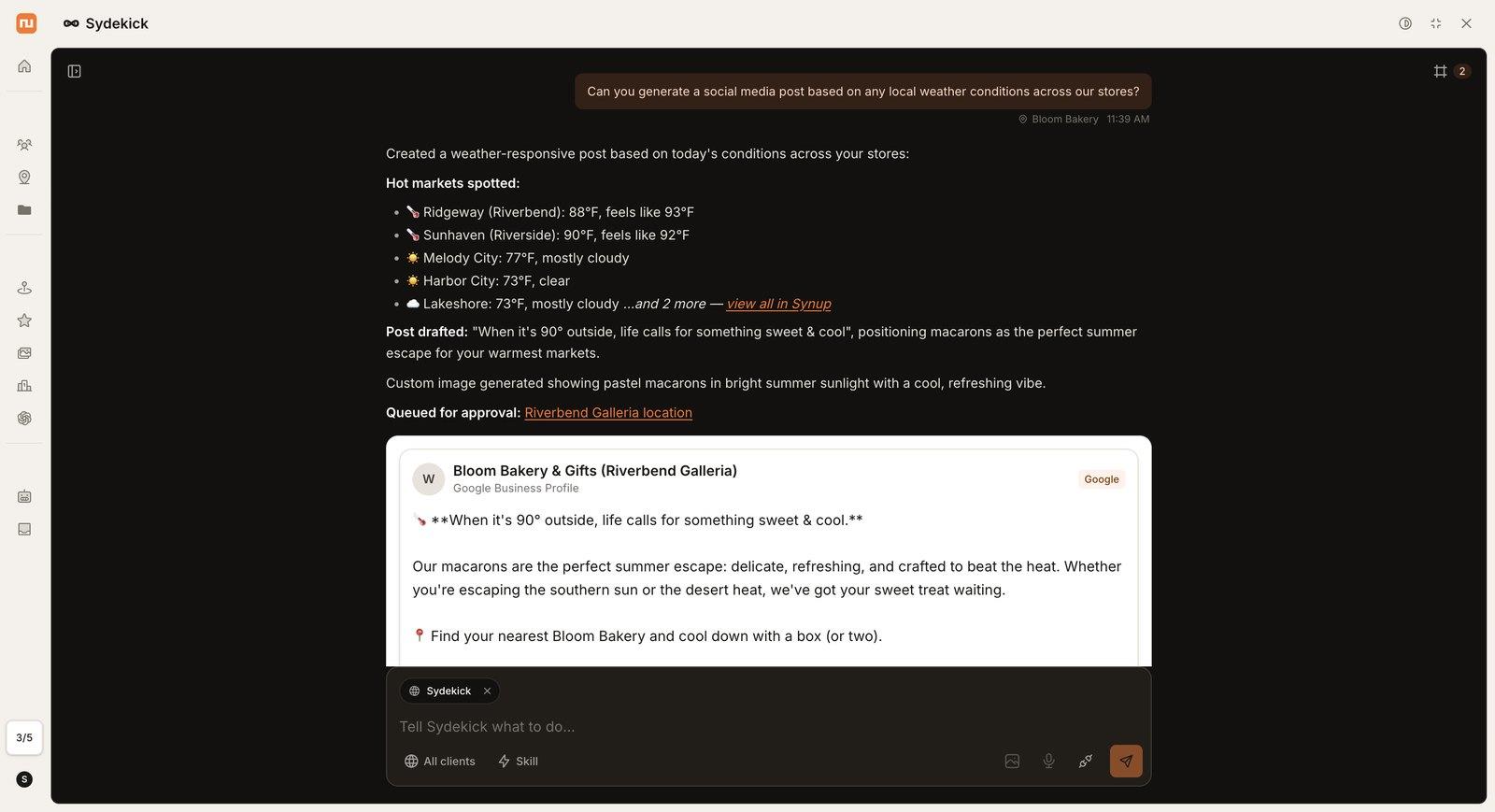 Sydekick checks the weather at each store, drafts a post, generates an image, and queues it for approval. Screenshot from Synup’s demo workspace.
The Synup Story: Where It Came From
Synup was started by Ashwin Ramesh, Karthik Krishnamoorthy, and Mohan Gopalakrishnan.
Entrackr reports they founded it in 2013 (Gartner and other sources list 2014).
The idea came from a very boring problem.
Business listings were inconsistent all over the internet, and fixing them by hand was painful.
Seed money came from Prime Venture Partners, and YourStory’s 2017 profile says Synup turned cash-flow positive by March 2016.
In 2017, it raised a $6 million Series A led by Vertex Ventures.
Later, it expanded into agency tools, including the acquisition of CRM platform Clientjoy.
Then came the 2026 rebuild.
Synup’s CEO called the Sydekick launch a major step toward fully agentic local marketing, according to a launch summary on NewsBytes.
So this is a 12-year-old company that just bet its whole product on AI.
That’s both the exciting part and the risk.
Who Is Synup For?
Agencies. Synup is built around client accounts, white-labeling, and a branded portal.
Multi-location brands. You manage every location from one command center.
Franchises. Synup says it supports per-location overrides and brand-level controls.
Single-location owners. The Solo plan covers 1 location at $39 to $49 a month with every feature included.
Software platforms. The API is built so other products can run listings and review features inside them.
5 Real-World Use Cases
These are scenarios based on how the product is built, not customer results.
1. The agency adding local SEO as a service
Picture an agency with 10 small clients that all need listings, reviews, and Google posts.
Premium covers up to 10 locations at $299 a month ($239 on annual billing), with white labeling included.
That’s $29.90 per location before you mark it up.
If you’re still picking a niche for your agency, my list of the most profitable affiliate marketing niches is a good place to start
2. The franchise changing holiday hours
A franchise owner needs to change hours at every branch before a holiday.
Synup says bulk changes across thousands of locations happen through a single instruction.
That’s the kind of job that eats an afternoon when you do it by hand.
3. The solo local business owner
A dentist, plumber, or salon owner with one location doesn’t need an agency tool.
Solo gives you the whole feature set for 1 location, including review replies and the rank grid.
4. The brand worried about AI search
If customers ask ChatGPT for “the best pizza near me,” you want to know what it says about you.
Synup’s AEO feature scores each location per engine across ChatGPT, Gemini, and Perplexity.
5. The software company adding local marketing
A SaaS platform serving restaurants or clinics can plug into Synup’s API.
Synup says the API is headless and built to scale across millions of locations.
Synup Pricing Breakdown (2026)
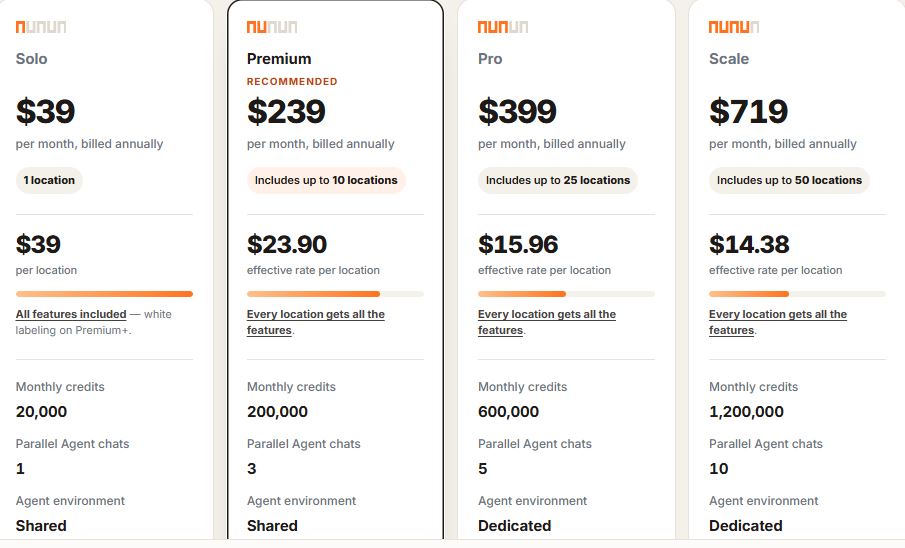
Here’s the current rate card from Synup’s pricing page.
| Plan | Locations | Monthly billing | Annual billing | Effective cost per location (monthly) | Agent chats at once | Agent environment | White label |
|---|---|---|---|---|---|---|---|
| Solo | 1 | $49 | $39 | $49.00 | 1 | Shared | No |
| Premium | Up to 10 | $299 | $239 | $29.90 | 3 | Shared | Yes |
| Pro | Up to 25 | $499 | $399 | $19.96 | 5 | Dedicated | Yes |
| Scale | Up to 50 | $899 | $719 | $17.98 | 10 | Dedicated | Yes |
| Enterprise | 50+ | Contract | Contract | Custom | Custom | Dedicated | Yes |
Synup’s pricing page toggles between annual and monthly, so confirm the exact figure at checkout.
What a location counts as
Synup’s pricing FAQ defines a location as one physical address with its own listing.
Service-area businesses count as one location per service area you publish.
A single address with two brands operating from it counts as two.
That last rule catches people, so check it before you pick a band.
Monthly credits
Credits fuel the agent and anything with a real infrastructure cost behind it.
On Synup’s page, the monthly allowances are 20,000 (Solo), 200,000 (Premium), 600,000 (Pro), and 1,200,000 (Scale).
Those figures are four times the base allowance during the launch promotion, and Software Advice lists 5,000, 50,000, 150,000, and 300,000.
When credits run out, agent work pauses rather than failing silently.
Listings stay live, reviews keep being collected, and rank tracking keeps running.
You can buy more credits in blocks at the same rate your plan already pays.
Contract and billing
Synup says plans are monthly and you can leave at the end of a billing period.
Annual terms are optional if you want the discount.
Billing is by card or invoice, monthly in advance.
When you cross into the next band, you move to that plan’s price from the following cycle, prorated.
The free trial
The 14-day trial lets you explore the Solo plan.
White labeling isn’t included in the trial because it needs Premium or above.
If you start a paid Premium subscription, it triggers an immediate charge and the free trial doesn’t apply.
Synup’s AI info page says the trial requires no credit card.
Cost to replicate with separate tools
Synup’s pricing page includes a calculator comparing its price to typical standalone tools.
The numbers are Synup’s own illustrative list prices per location, not quotes.
| Capability | Tools it replaces (per Synup) | Standalone cost per location |
|---|---|---|
| Listings management | Yext, Uberall | $27 |
| Review management | Birdeye, Podium | $30 |
| AI answer optimization | Profound, Peec AI | $15 |
| Local SEO and rank grid | BrightLocal, Local Falcon | $8 |
| Social publishing | Sprout Social, Later | $12 |
| Landing pages | Bindable, agency build | $10 |
| Total per location | $102 |
Add those up and the stack is $102 per location per month.
Here’s how that compares to Synup’s monthly-billing prices.
| Locations | Separate tools (at $102 each) | Synup plan (monthly billing) |
|---|---|---|
| 1 | $102 | $49 (Solo) |
| 10 | $1,020 | $299 (Premium) |
| 25 | $2,550 | $499 (Pro) |
| 50 | $5,100 | $899 (Scale) |
The math only works if you’d really buy all six categories.
If you only need listings, you don’t need to replace a $102 stack.
My honest take on the pricing
One location at $39 to $49 a month is a good deal for that feature set.
The per-location cost drops fast as you grow, which is great for agencies.
But the bands have cliffs.
Going from 10 locations to 11 moves you from $299 to $499, so that eleventh location costs you $200.
Going from 25 to 26 moves you from $499 to $899.
And Solo only covers 1 location, so on the published rate card, two locations land on Premium at $299, which is $149.50 each.
So plan your location count before you commit.
Start your Synup free trial and check your own location count
Synup Features: What You Actually Get
Every feature below is included on every plan, per Synup’s pricing page.
The plan you pick changes capacity, not access.
1. Sydekick, the AI agent
Sydekick is the center of the product now.
You talk to it in plain language, and it acts across listings, reviews, social, SEO, and reports.
According to Synup’s launch coverage, it can also build images, rich media, and location landing pages.
It also works inside Slack and Microsoft Teams, so a store manager can ask for work without opening Synup.
Synup connects to more than 5,000 integrations.
The same release claims 94% of the actions Sydekick proposes are approved without edits across live workspaces.
That’s a vendor number from a sponsored press release, so test it on your own account.
The agent works from skills and playbooks.
Skills are purpose-built abilities, and playbooks are repeatable workflows it runs for you.
Synup says you can start with a ready-made library and build your own for processes unique to your agency or brand
It also keeps memory of your brand, tone, and history.
Here’s my honest read.
The idea is strong because bulk work is exactly where agents help.
So don’t expect magic on day one.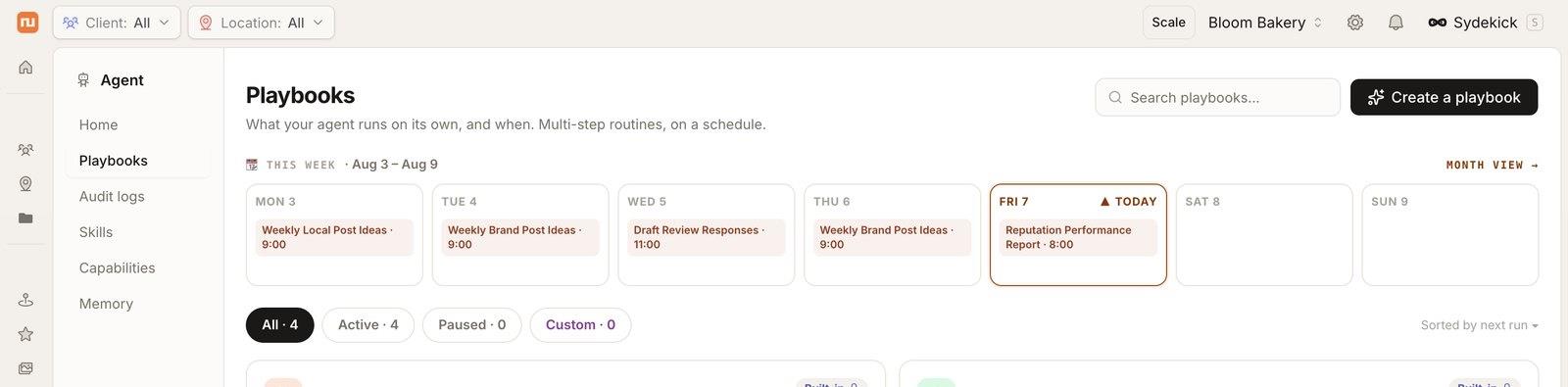
The Playbooks screen shows this week’s scheduled runs, like weekly post ideas and review replies. Screenshot from Synup’s demo workspace.
2. Listings management
This is where Synup started.
You enter your name, address, phone, hours, categories, and attributes once.
Synup pushes them to its publisher network and keeps them in sync as they change.
Synup’s press materials mention 100+ publisher syndications.
The G2 listing says Synup syncs across Google, Apple, Bing, Facebook, and other major platforms, and verifies the data is indexed and visible, not just submitted.
The pricing page adds a feature called autonomous corrections.
That means drift in your listings is detected and fixed without a person opening the record.
 If you’ve ever found a wrong phone number on some random directory, you know why this matters.
Listings health for 90 locations: sync rate, connection issues, duplicates, and the weakest publishers. Screenshot from Synup’s demo workspace.
3. Review monitoring, replies, and requests
Reviews come in from every connected source and get collected against the right location.
Sydekick drafts replies, you approve them (if you’ve set approval rules), and they publish in place.
Synup also runs review request campaigns over email and SMS, tracked per location.
If email is your main channel, see my roundup of the best email marketing platforms.
Why care?
BrightLocal’s 2026 data says 97% of consumers read online reviews for local businesses.
One thing to watch.
That’s a fair warning for any review tool, so ask every customer for a review, not just the happy ones.
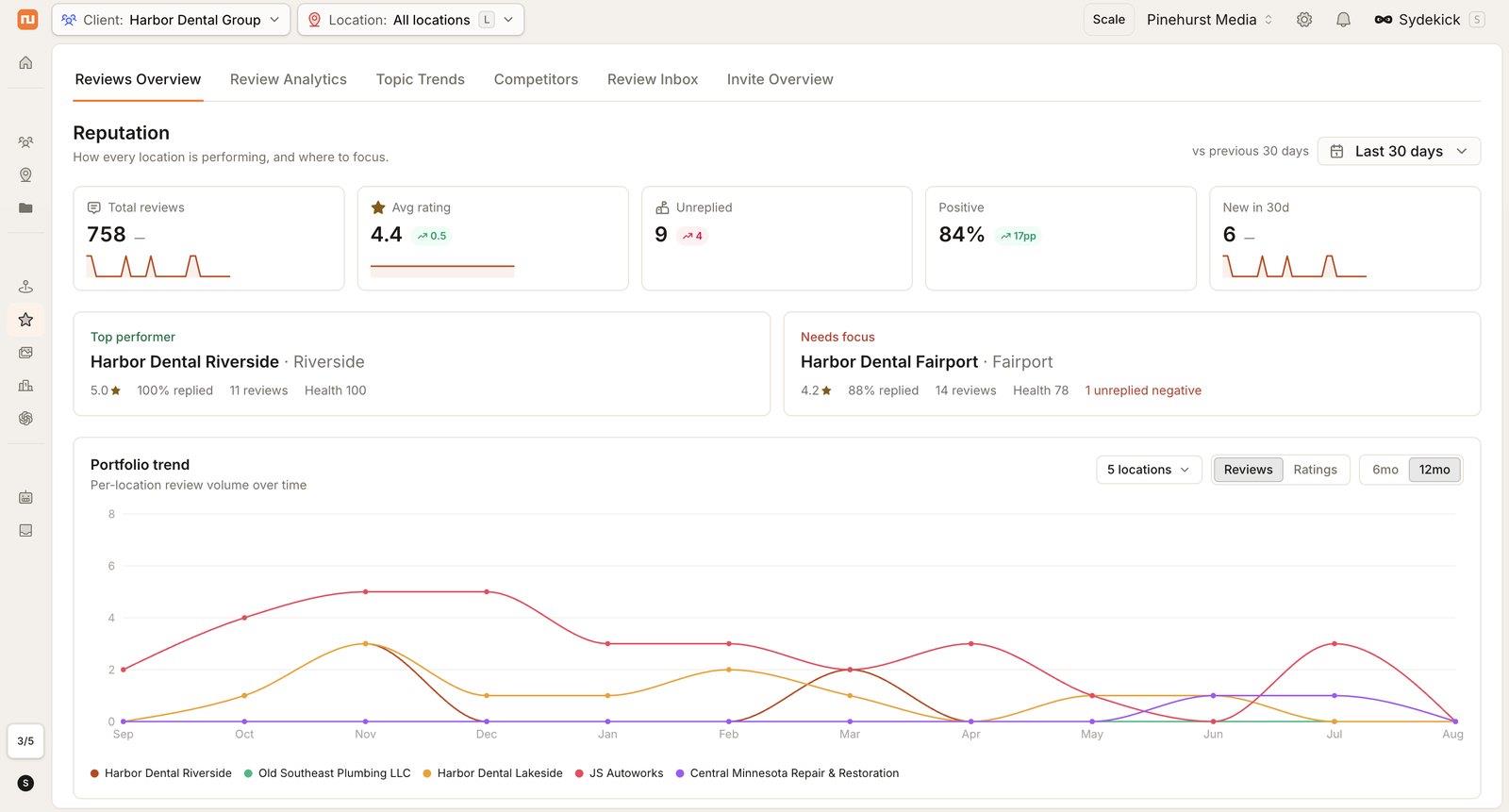 The reputation overview shows total reviews, average rating, unreplied reviews, and which locations need attention. Screenshot from Synup’s demo workspace.
4. Social publishing
Synup publishes to Google Business Profile, Facebook, Instagram, and LinkedIn.
Sydekick can generate localized content per location, so a post for your Nairobi branch doesn’t read like your Boston branch.
Synup says approval workflows exist, with per-location, per-channel, and per-role settings.
That’s useful if you don’t want an AI posting unreviewed content to a client’s page.
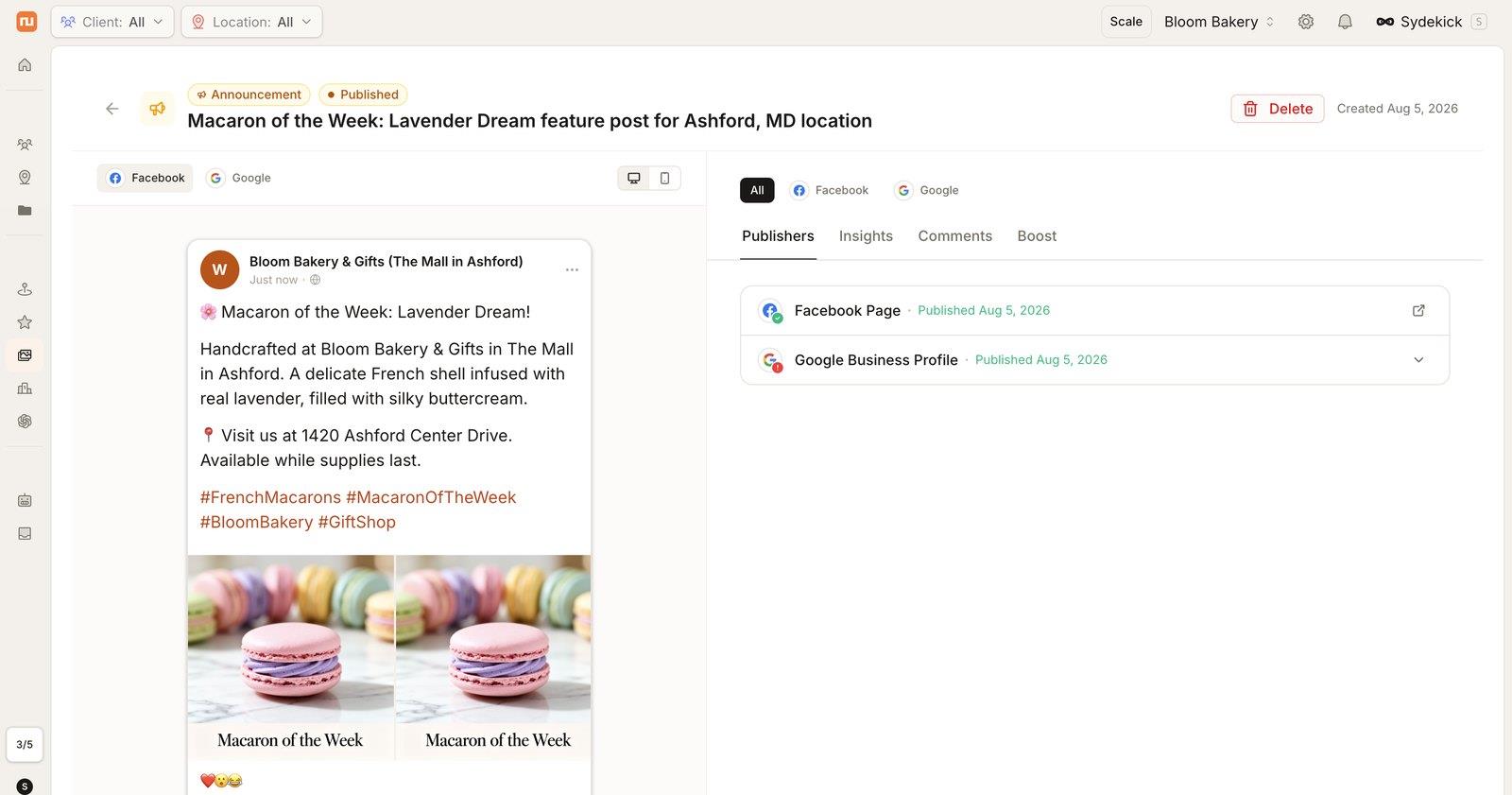 G2 users also report the AI is good for getting social drafts started, though they still want room to review and refine.
A “Macaron of the Week” post for one bakery location, published to its Facebook page and Google Business Profile. Screenshot from Synup’s demo workspace.
5. Local Rank Grid and SEO
The Local Rank Grid is a geo-grid tracker.
Instead of one city-wide average, it shows where a location ranks block by block for a keyword.
Synup also includes a Visibility Score and competitor insight, showing who ranks where you don’t.
This used to be a separate subscription for a lot of agencies.
Synup’s calculator lists BrightLocal and Local Falcon as the tools it replaces here.
If you also track rankings for your own site, my Semrush review covers a broader SEO suite.
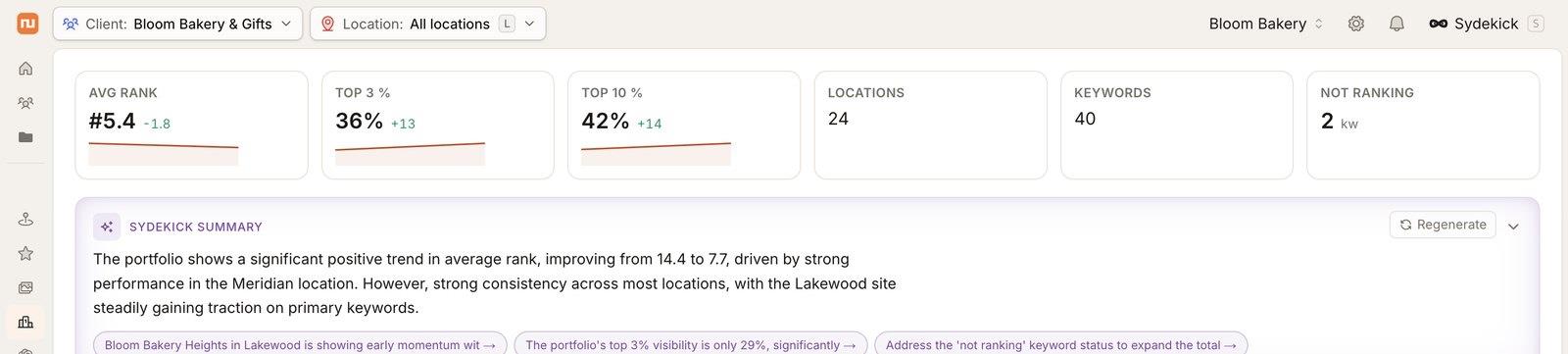
The local SEO view shows average rank and top-3 and top-10 share, with a written summary from Sydekick. Screenshot from Synup’s demo workspace.
6. AEO: AI search visibility
AEO stands for answer engine optimization.
Synup’s version scores each location per engine across ChatGPT, Gemini, and Perplexity, and shows whether the location gets cited.
When it doesn’t, Synup says it helps you fix what those engines read.
This matters more every month.
BrightLocal’s 2026 survey says AI tool use for local recommendations went from 6% to 45%.
I’d treat the scores as a starting point, since nobody outside the AI companies fully controls what these engines say.
7. Landing pages and store locators
Synup generates a page per location on your own custom domain.
The pages come from the location record and update with it.
There’s also a store locator product for embedding a find-a-store experience.
For franchises and chains, this removes a boring but valuable job.
If you just need a single page, here are my picks for the best landing page builders.
8. Approvals inbox and audit trail
An AI agent that acts on your clients’ accounts needs guardrails.
Synup lists an approvals inbox, where you review and sign off on work, and an audit trail, a full record of every action taken.
This is the part I’d test first in the trial.
Set approvals to required, run a few tasks, and check the audit trail shows what you expect.
Per Synup’s launch coverage, proposed actions move through an approvals queue and can be assigned to team members.
The audit trail records what the agent did and why.
Usage is also attributed by client and skill, which helps if you want to price agent work into a retainer.
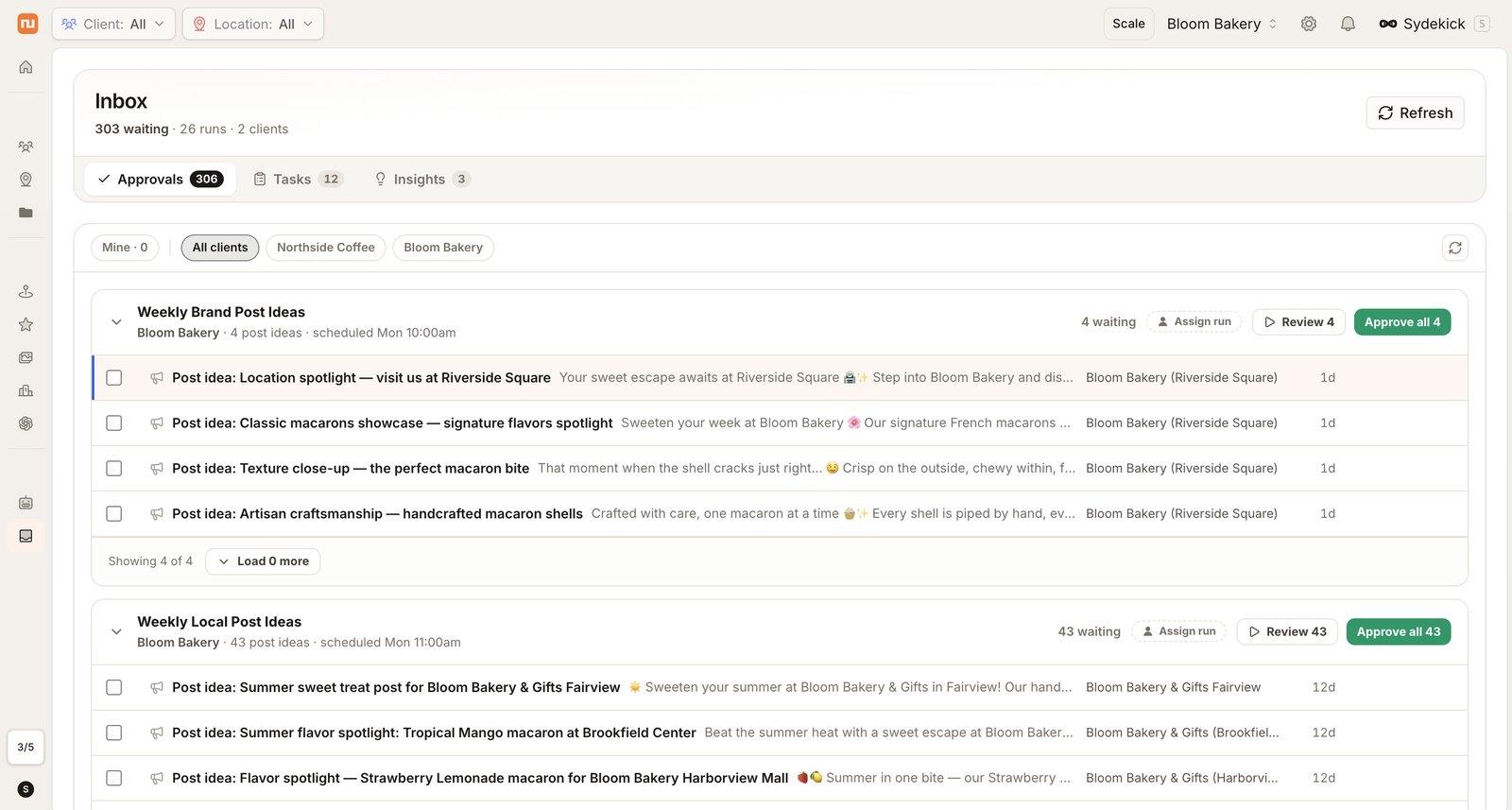 The approvals inbox groups drafted work by run, so you can review or approve in bulk. Screenshot from Synup’s demo workspace.
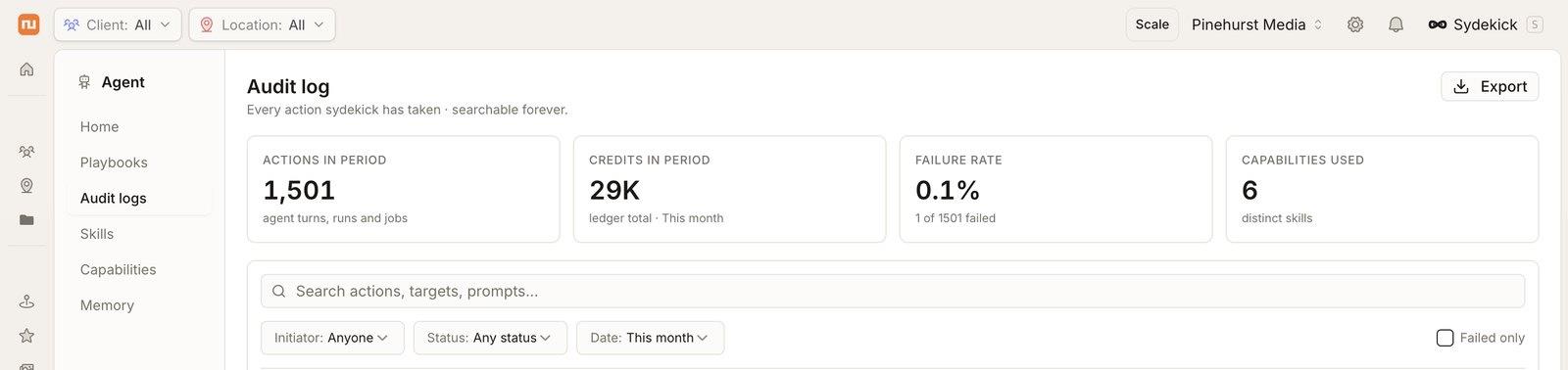 The audit log lists every agent action, what started it, and whether it succeeded. Screenshot from Synup’s demo workspace.
9. Reporting
You can ask Sydekick for a custom report in plain language, and Synup says it designs the report around your question instead of a fixed template.
PDF export also shows up in Synup’s recent product updates banner.
But this is the area users complain about most.
G2’s summary says users want more flexible reporting, clearer explanations of performance changes, and easier comparisons across locations or time periods.
A 2021 Capterra reviewer asked for more versatility and detail in reports too.
So if reporting is your top priority, test it hard before you commit.
White Label and the Partner Suite
Agencies are Synup’s core audience, so the partner tools are a big part of the value.
The Partner Suite includes:
- Multi-client command center: run every client from one place.
- Client portal: a branded portal that looks like yours.
- White label: your brand and domain, with no Synup branding.
- Team seats and permissions: scoped, per-client access for your team.
- White-labeled agent: deploy Sydekick inside each client’s portal, branded as yours.
The command center lists every location with completeness, connections, pending changes, and review health. Screenshot from Synup’s demo workspace.
White labeling requires Premium or above, and it isn’t part of the trial.
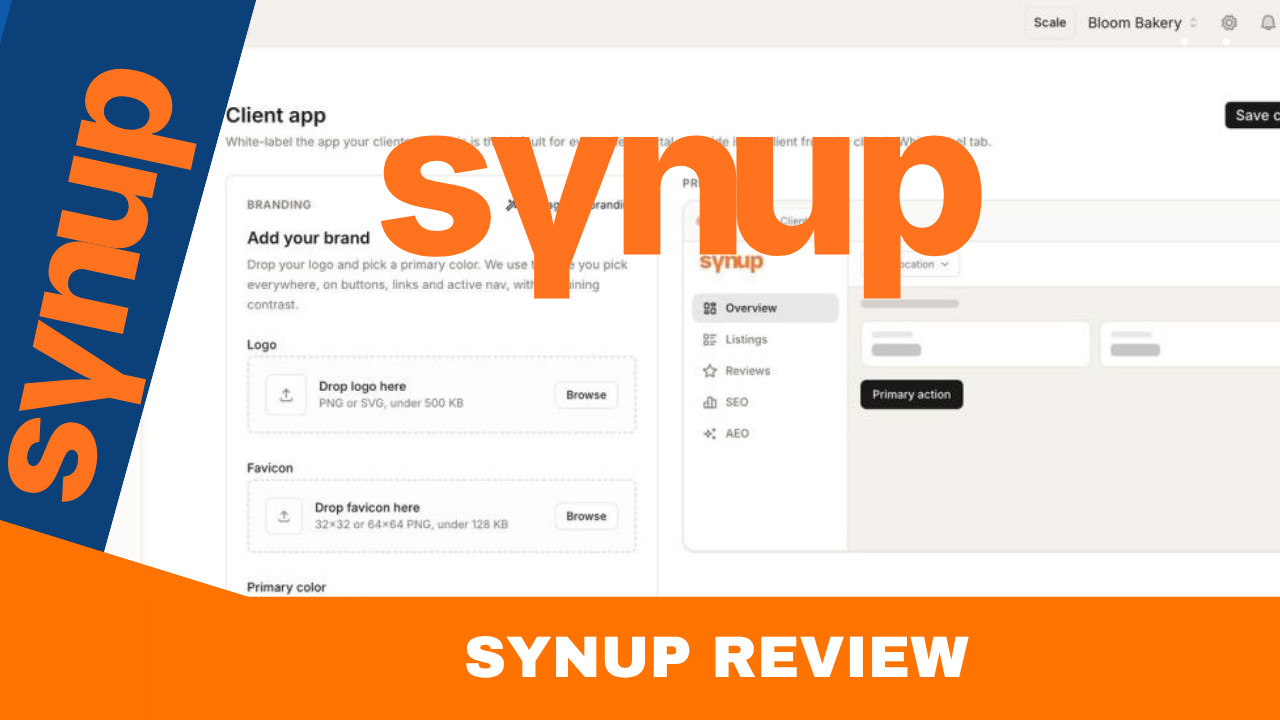
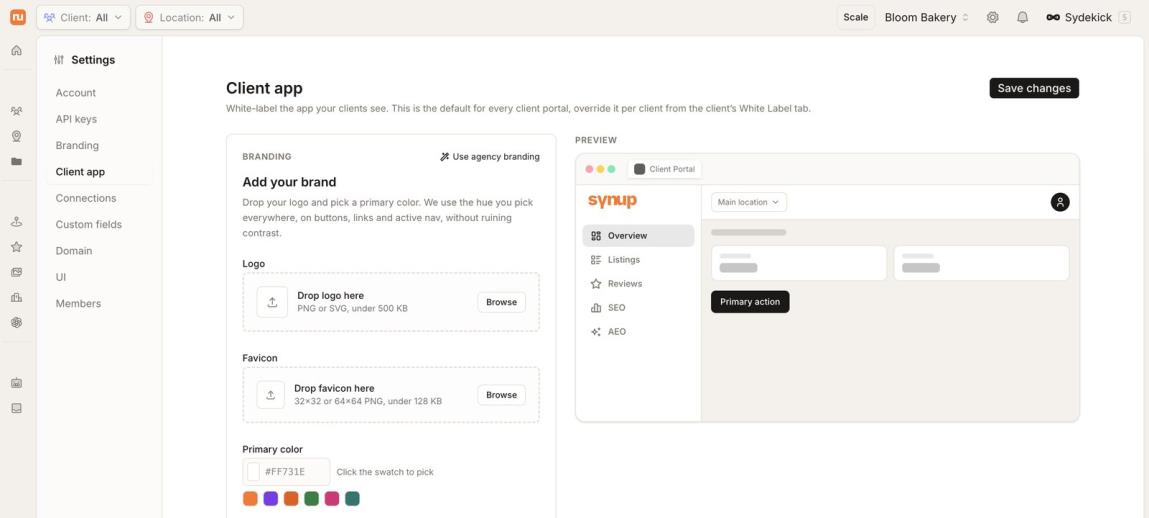 The Client app settings let you add your own logo, favicon, and brand color. Screenshot from Synup’s demo workspace.
Synup says this is a difference from tools that only white-label reports, and its BrightLocal comparison page makes that exact claim.
That’s a vendor comparison, so verify it for your own use.
If you’re building an agency, you might also like my GoHighLevel review, which covers a different kind of agency platform.
Synup MCP and API
I’m a fan of tools that plug into the AI apps you already use.
Synup has a native MCP server for that.
Per Synup’s MCP page, you can connect Claude, ChatGPT, Cursor, Windsurf, or any MCP-compatible client.
It uses OAuth 2.1 with PKCE, and tokens are scoped to read or write.
The documented tool domains are CRM, post ideas, and posts.
So you can ask your AI assistant to schedule a post for a client.
A caution here.
Synup’s G2 listing says MCP lets teams query listings and pull review data, but the MCP docs page I reviewed lists CRM, post ideas, and posts as the tool domains.
Check which tools your account actually exposes before you promise a client anything.
There’s also a REST API for developers.
G2 lists integrations with ChatGPT, Claude, Copilot, Gemini, Perplexity, Facebook, Instagram, Pinterest, Google Analytics, and Unsplash.
Setup and Onboarding
Synup’s comparison pages claim you can reach your first scan in about 20 minutes, self-serve.
That’s a vendor claim.
G2’s AI-generated summary says Synup can go live in under a day for many teams, while some setups take longer.
To get started, you’ll need:
- Admin access to each Google Business Profile.
- Your correct business name, address, phone, and hours.
- Logins or permissions for the social accounts you want to connect.
G2 reviewers say initial setup and account connections can take work.
That matches a 2023 Capterra reviewer who said linking Yelp took time, but support walked them through it.
So block out an afternoon, and start with one location.
Synup Ratings and What Users Say
| Source | Rating | Reviews | Notes |
|---|---|---|---|
| G2 | 4.6 / 5 | 335 | Small business is the biggest segment |
| Capterra | 4.1 / 5 | 17 | Ease of use 3.9, customer service 4.2 |
| Software Advice | 4.1 / 5 | 17 | Value 4.0, support 4.19, functionality 3.94 |
On Capterra and Software Advice, 12 of the 17 reviews are 5 stars, and 3 are 1 star.
Also, by my count, 15 of those 17 reviews were written in 2023 or earlier.
That means they mostly describe the older product, before Sydekick and the new pricing.
That reviewer said the sales call asked detailed questions about how they bill and price their own services.
I’d read these ratings as a mixed but incomplete picture.
G2 is the biggest sample by far, and it’s strong.
What reviewers like
- Support is often described as helpful, knowledgeable, and responsive
- Many switched from tools like Yext, Semrush, BrightLocal, and Moz Local for lower cost or broader features.
- One Capterra reviewer said it’s built with multi-location review management in mind.
What reviewers don’t like
- Reporting depth and flexibility.
- Setup friction and permissions.
- Billing and contract complaints from some past customers on Capterra, including one 2024 review about a disputed $10,000+ balance and a 2020 review about a cancellation fee.
Those last two are the opinions of individual reviewers, and I can’t verify the details.
Synup’s current pricing page says plans are monthly and you can leave at the end of a billing period.
Still, read your order form before you sign anything.
Synup Pros and Cons
Pros
- Every feature is included on every plan.
- A real 1-location plan at $39 to $49 a month.
- Geo-grid rank tracking and AI search tracking are included.
- White labeling, client portal, and a white-labeled agent for agencies.
- Approvals inbox and audit trail for the AI agent.
- MCP and API support.
- 14-day free trial.
- G2 rating of 4.6 from 335 reviews.
Cons
- Reporting flexibility is a repeat complaint.
- High price jumps between bands (10 to 11 locations is +$200).
- Credit allowances are a moving target, with a launch bonus that may not apply to new accounts.
- Sydekick can be slow, per G2 users.
- Capterra has a few harsh 1-star billing and sales complaints.
- Small review samples on Capterra, Software Advice, and Gartner.
- Trial excludes white labeling.
Things You Won’t Notice Until You’re Inside
These are the details I’d check before paying.
- Credits are the real limit. Locations set your band, but credits set how much the agent can do. When they run out, agent work pauses while listings, reviews, and rank tracking keep running.
- The launch credit bonus may not apply to you. Synup says the quadrupled allowances are for accounts created on or before September 30. Look at your own plan page.
- Band cliffs are real. The jump from 10 to 11 locations costs $200 more, and 25 to 26 costs $400 more, based on the published rate card.
- Locations are counted by address and brand. Two brands at one address count as two.
- White label needs Premium. The trial is Solo, so you can’t test white labeling for free.
- Parallel agent chats are capped. Solo gets 1 at a time, Premium 3, Pro 5, and Scale 10.
- Shared vs. dedicated agent environment. Solo and Premium share infrastructure, and Pro and above get dedicated.
- CRM is unclear. Synup’s MCP docs still list CRM tools, but the current pricing page doesn’t headline CRM, so ask what’s included if you need it.
Common Mistakes to Avoid
Buying Solo for an agency. Solo is 1 location with no white labeling.
Guessing your location count. Count addresses and brands first.
Letting the agent publish without approvals. Turn approvals on for new clients until you trust the output.
Judging Synup by old reviews. Most Capterra and Software Advice reviews are from 2023 or earlier, before the rebuild.
Skipping the order form. A few past customers complained about billing and cancellation terms, so read yours.
Expecting rankings overnight. Listings and reviews help local SEO, but they’re not a switch you flip.
Sending review requests only to happy customers. That’s a policy risk on Google, so ask everyone.
Synup vs the Alternatives
A fair warning: the claims below about Synup’s rivals come from Synup’s own comparison pages, so treat them as the vendor’s view.
Synup vs Yext
Yext is the big enterprise name in listings.
It has a 4.4 rating from 1,128 reviews on G2.
Synup’s comparison page says Yext’s multi-location pricing is quote-only and that agencies that switched saved about 38% per location.
That figure is Synup’s, so ask Yext for a quote and compare.
Synup vs Birdeye
Birdeye is the stronger name in reviews.
It has a 4.7 rating from 4,323 reviews on G2, which beats Synup on both rating and sample size.
Synup’s Birdeye comparison argues it offers a broader platform for agencies.
If reviews are your only need, price Birdeye too.
Synup vs BrightLocal
BrightLocal is known for audits and citation tools.
Synup’s BrightLocal comparison says BrightLocal charges per citation and for managed SEO, while Synup includes the work in its plans.
Check BrightLocal’s own pricing before you decide.
Synup vs Moz Local
Moz Local focuses on listings.
Synup’s Moz Local comparison says Moz Local starts around $20 per location per month for listings only.
Synup’s pitch is that listings, reviews, social, and AI visibility come in one price.
How to Get Started With Synup
- Open the free trial and pick Solo.
- Add one real location, ideally your own or your easiest client.
- Connect Google Business Profile and any social accounts.
- Turn approvals on in the approvals settings.
- Ask Sydekick for a small task, like drafting replies to your latest reviews.
- Check the audit trail to see exactly what it did.
- Run a Local Rank Grid for one keyword.
- Run the AI visibility check for the same location.
- Only then decide whether to move up to Premium for white labeling.
Start your Synup free trial here
Who Should Skip Synup?
Synup isn’t for everyone.
Skip it if you’re still learning the basics and don’t have clients yet.
My Wealthy Affiliate review is a better first step for that stage.
Skip it if your only need is a one-time citation cleanup and you won’t use the rest.
Skip it if your top priority is deep, custom analytics reporting, since that’s the most common complaint.
Be careful if you manage 11 or 26 locations, because you’ll land just past a band and pay for headroom you don’t use.
And skip it if you want a CRM, invoicing, and funnel builder in one place, because that’s not what the current pricing page sells.
If that’s what you need, start with my Systeme.io review instead.
My Scores
These are my editorial scores, based on the published features, the review data above, and what I see in the product.
| Category | Score |
|---|---|
| Features | 9 / 10 |
| Ease of use | 7.5 / 10 |
| Value for money | 8.5 / 10 |
| Support | 8 / 10 |
| Reporting | 6.5 / 10 |
| Overall | 8 / 10 |
The ease of use score reflects Capterra’s 3.9 out of 5 for ease of use.
The reporting score reflects the most repeated complaint on G2.
Final Verdict
Synup has gone from a listings tool to an AI agent platform in one rebuild.
For a single location, $39 to $49 a month for every feature is hard to beat.
For agencies, Premium at $299 for up to 10 locations with white labeling is a strong starting point.
The risks are real, though.
Reporting is the weak spot; the price bands have cliffs, and Sydekick is new, so it will have rough edges.
My advice is simple.
Take the 14-day trial, test one location, turn on approvals, and judge the agent by its audit trail, not its demo.
Synup also runs an affiliate program, and I’ve listed others in my guide to the best recurring affiliate programs.
And if you plan to promote tools like Synup, my 30 best affiliate marketing hacks will sharpen your approach.
Try Synup free for 14 days
Customer Results Synup Has Published
Synup runs a customer stories library with 20 stories from agencies and multi-location brands.
These are Synup’s own case studies, so they’re marketing, not independent proof.
They also describe what happened for those customers, not what you’ll get.
With that in mind, here are the ones I’d read first.
| Customer | Type | Headline result, as Synup published it |
|---|---|---|
| Zoek | Full-service agency | 152% more direction requests, 73% more website visits, 62% more call requests |
| Olive Street Design | Small agency | 5 to 6% direct revenue impact, 25% more website visits, 24% more direction requests |
| Palm Beach Tan | Retail brand | 218% more store visits |
| Jiffy Lube | Franchise network, 2,000+ locations | 116% more location reviews |
| Goodwill Industries (Southern Arizona) | Nonprofit | 45% more donation volume |
| Woops! Macarons | Bakery franchise | 20% more revenue through profile personalization |
Synup’s library page also lists rolling averages across its customers.
Those are 5 to 6% direct revenue impact, 25% more website visits, 24% more direction requests, and 18% more phone calls.
Two stories stand out for different readers.
Olive Street Design is the agency angle, since its owner says the work takes about an hour at the start of each month.
The newer Woops! Sydekick story is the one to read if you want to see how a franchise uses the agent.
My advice is to ask Synup which story matches your industry before you buy.
Synup FAQ
Here are the questions I get asked most about Synup, answered straight.
What is Synup?
Synup is a local marketing platform for agencies and multi-location businesses.
It covers listings, reviews, social publishing, local rank tracking, and AI search visibility.
Its AI agent, Sydekick, does a lot of that work from plain-language instructions.
How much does Synup cost?
Solo is $49 a month, or $39 on annual billing, for 1 location.
Premium is $299 ($239 annual) for up to 10 locations.
Pro is $499 ($399 annual) for up to 25, and Scale is $899 ($719 annual) for up to 50.
Enterprise is custom for 50+ locations.
Does Synup have a free trial?
Yes, a 14-day trial of the Solo plan.
White labeling isn’t included in the trial.
Synup states the trial needs no credit card.
Is Synup legit?
Yes, it’s an established company with a long track record.
It was founded in 2014, per Gartner, and raised a $6 million Series A in 2017.
It holds a 4.6 on G2 from 335 reviews.
But a few Capterra reviewers complained about billing and contracts, so read your order form.
What is Sydekick?
Sydekick is Synup’s AI agent.
You give it instructions in plain language, and it runs tasks across listings, reviews, social, SEO, and reports.
What are Synup credits?
Credits fuel the agent and other usage-based work.
When they run out, agent work pauses, and you can buy more.
Your plan page shows your allowance.
Can I white-label Synup?
Yes, on Premium and above.
You get a branded portal, your own domain, and a white-labeled agent.
It isn’t available in the free trial.
Does Synup work with ChatGPT and Claude?
Yes, through its native MCP server.
It works with Claude, ChatGPT, Cursor, Windsurf, and other MCP clients.
Check which tools your account exposes.
Is Synup good for a single location?
Yes, the Solo plan is built for that.
You get every feature for 1 location at $39 to $49 a month.
Can I cancel Synup anytime?
Synup’s pricing page says plans are monthly and you can leave at the end of a billing period.
Annual plans are optional.
Read your own order form to confirm your terms.
How does Synup compare with Yext and Birdeye?
Yext is an enterprise listings leader, and Birdeye leads on review volume and ratings on G2.
Synup’s angle is one price for the whole stack, plus white labeling for agencies.
Get quotes from all three before you decide.
Is Synup worth it?
For most agencies and multi-location brands that need several local marketing tools, it’s worth a trial.
If you only need one narrow feature, a single-purpose tool may be cheaper.
Synum Review :Conclusion
So, is Synup worth it?
If you manage local listings, reviews, and rankings across clients or locations, I think the answer is yes, with a few cautions.
Go in with a plan for your location count, watch your credits, and use approvals until you trust the agent.
Then judge it by what you see in your own account.
One more thing before you go.
Synup lets you sell local marketing under your own brand, with white-label and an API behind it.
But what if you want to build your own software product?
That’s where MakerAI fits.
It’s an AI-powered platform that helps entrepreneurs create and launch their own software businesses, including SaaS products, without any programming experience.
Use Synup to serve local clients today, and use MakerAI to turn what you learn into your own software business.
Thanks for reading my Synup Review 2026, and if you try it, start with the free trial here.
Synup
Synup is an all-in-one local marketing and SEO platform that helps businesses, marketing agencies, and multi-location brands improve their online visibility, manage customer reviews, and attract more local customers.
Price: $39
Price Currency: US Dollars
Operating System: Online
Application Category: Local SEO
4.7